
Compare the agreed event plan with supplier counts, access requirements and setup times, then prepare a briefing your team can review.
Find conflicting supplier commitments before event day
Designed for wedding planners, venues and event agencies. Explore the workflow with fictional sample records before scoping a client pilot.
What you can test today
Align guest counts
Find differences between the event plan and supplier records.
Check setup windows
Flag setup before venue access or after the ceremony begins.
Find missing contacts
Identify supplier commitments without a named confirmation owner.
Build the briefing
Record actions and export the source-backed readiness report.
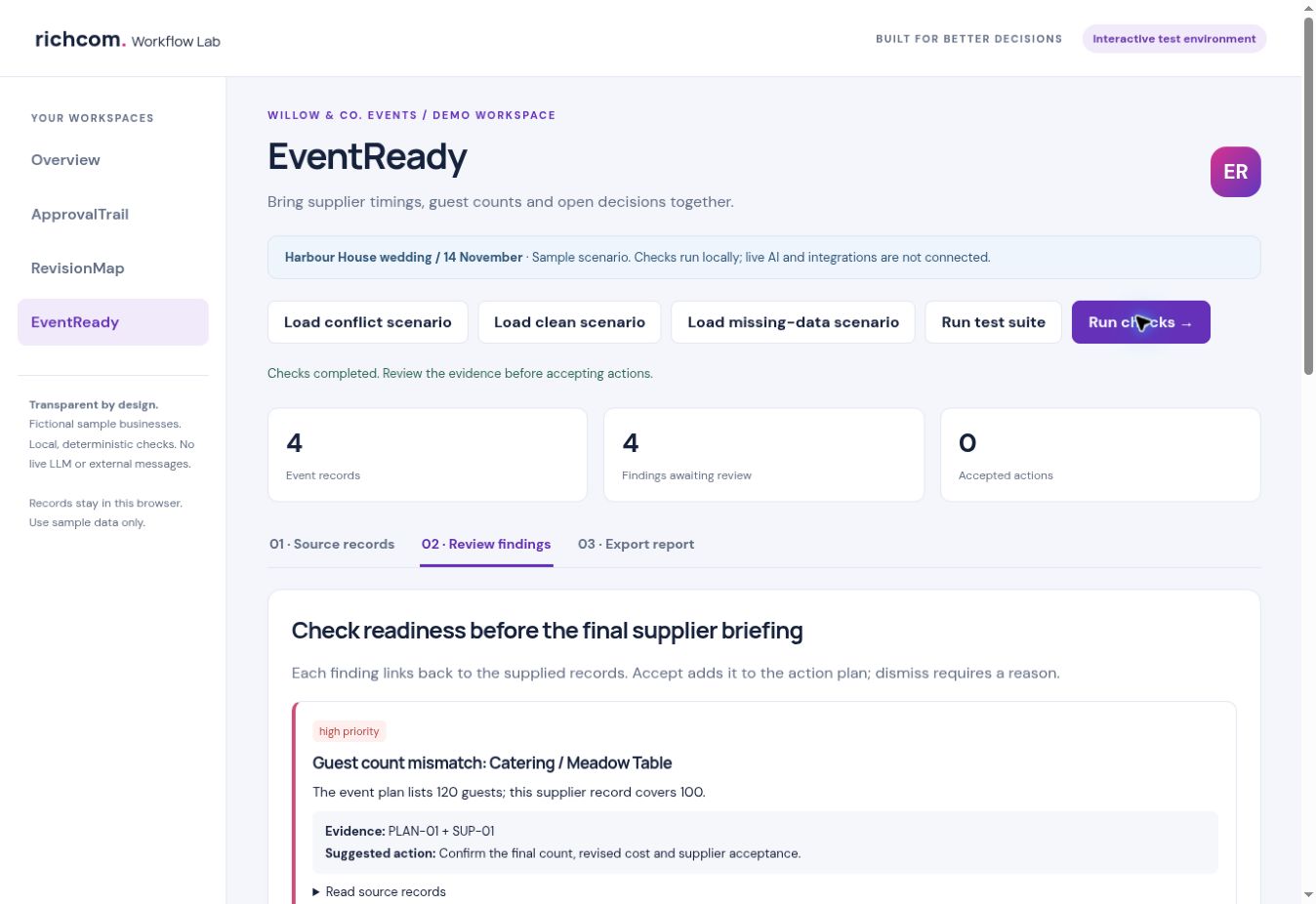
A realistic example
Willow & Co. Events is planning a 120-person wedding. Catering covers 100 meals, flowers finish after the ceremony starts and sound arrives before venue access. The demo highlights all three conflicts and a missing supplier contact.
How the workflow works
- Load the event plan and supplier commitments.
- Run checks for counts, setup times and missing contacts.
- Assign actions and review the underlying source records.
- Export a briefing for human approval before contacting suppliers.
Built for reviewable decisions
Findings retain source IDs, suggested next steps and review notes. Accept an action, dismiss it with a reason or reopen it. Export the text report and structured records with the audit trail. Records are stored in the browser for this prototype, rather than a shared production database.
Current prototype and planned AI capabilities
The current demo implements editable JSON records and deterministic checks. Live LLM interpretation, PDF and image extraction, email import and external integrations are not connected. A client pilot would define the required inputs, access controls, retention and acceptance tests before those features are enabled.
The planned model ceiling is GPT-6.1 Sol or a benchmarked equivalent. Usage limits and server-side credentials would be configured for the pilot. Human approval remains part of the workflow.
Walkthrough and practical guide
Download the EventReady colour PDF walkthrough
A colour PDF walkthrough with genuine screenshots of the working prototype is available for a guided demonstration. Read How to Check Event Supplier Commitments Before the Final Briefing for the process and current boundaries.
Frequently asked questions
Can we test with our own records?
The demo accepts structured JSON records. Use fictional or suitably anonymised data in the test workspace. Live document sources and shared business records require a separately configured pilot.
Does accepting a finding send a message or change a document?
No. It records a review decision and action note. External communication and publishing are outside this release.
Is this ready for an unattended production rollout?
This is an interactive test prototype. Production requirements, integrations, model evaluation and service pricing are agreed after the workflow has been tested.